
A Year Ago I’d Have Scheduled This Tool. This Time I Built It in an Afternoon.
A customer had about 30 new devices that all needed a Windows Autopilot Group Tag before they could go out the door. The Group Tag decides which deployment profile a device lands in, which means it drives everything that follows: the apps, the policies, the whole out-of-box experience. So it matters, and it has to be right.
The catch is that setting it in the Intune portal is a click-per-device job. Thirty devices is roughly an hour of clicking through the same screens, and the moment a next batch shows up you start over.
A year ago my options would have been to do it by hand, or ask a developer to build something and wait my turn. This time I built the tool myself in an afternoon, with Claude Opus 4.8 doing the actual typing. I want to walk you through how that went, because the finished tool isn’t the interesting part. The path to it is.
Start with the problem, not the code
I didn’t open with a request for code. I described what I needed in plain terms. A tool that bulk-assigns Autopilot Group Tags. It should take a list of serial numbers, ideally from a CSV, look the devices up in the tenant, and let me apply a tag to all of them at once. And it had to run on a normal Windows machine with no installer, because that’s the reality of working on a customer’s environment.
From that, Claude proposed the shape: a small PowerShell app with a WinForms interface, talking straight to the Microsoft Graph API. Which matched what I had in my head. PowerShell runs everywhere in our line of work, and Graph is where Autopilot lives. So I had a plan before a single line of code existed, which is the part of this I’d underline if I underlined anything.
The first version met the real tenant and lost
The first working version looked up devices by asking Graph to filter server-side, something like “give me the device where the serial number contains this value.” Clean on paper.
Then I ran it against the real tenant, and it broke.
That’s the bit that usually gets left out of these stories. The first version rarely survives contact with a real environment. The windowsAutopilotDeviceIdentities endpoint didn’t handle that contains filter reliably, and it got worse with the dashed serial numbers our virtual machines use, the long ones with blocks of digits split by dashes.
So I fed back exactly what failed, showed what the serials actually looked like, and changed the whole approach. Instead of filtering on the server, the tool now pulls every Autopilot device in the tenant once, pages through the results properly by following @odata.nextLink until there’s nothing left, and matches locally.
I made the matching deliberately forgiving, in three passes. Exact match first. If that misses, strip out every dash and space and compare again. If that still misses, fall back to a partial match on the normalized value. That handles the messy reality of how serials get typed, pasted, and formatted differently in five different places. After that change, lookups worked every time.
The wall I didn’t see coming: authentication
This was the bigger one, and the most interesting.
The tool needs to sign in to Graph. The normal route is Microsoft’s default sign-in app, where the user logs in interactively and the tool acts on their behalf. The customer’s tenant blocked that default app. On top of that, their own app registration had no redirect URI configured, and I couldn’t add one. Interactive sign-in needs that redirect URI, so that door was shut too.
I pasted the actual sign-in errors and explained what was and wasn’t allowed in their environment. Working through it, I landed on a different model: app-only authentication, also called client credentials. Instead of a user signing in, the app authenticates as itself with a client secret. Their app registration already had the right application permission for it, DeviceManagementServiceConfig.ReadWrite.All, with admin consent. Which is exactly what app-only needs, and it sidestepped both blockers at once.
The trade-off with app-only is that you’re holding a secret, and a secret in a script is a liability. So I handled it carefully. The secret never lives in the code. The user types it once at runtime in a masked field, and if they choose to remember it, it gets stored encrypted on that specific machine for that specific Windows account, in a location kept well out of any synced folder. I knew the environment and the security expectations, and I leaned on Claude for the implementation patterns to match them.
That solved the sign-in problem, but it isn’t a free win, and I think it’s worth being straight about that. When you authenticate as the app instead of as a user, the tool acts with the app’s permissions across the whole tenant, regardless of who’s running it. The convenience is obvious. So is the risk: anyone who can launch the tool with that secret can change Group Tags tenant-wide, and the actions tie back to the app, not to a person. You lose the per-user accountability you normally rely on.
That’s why the secret handling matters as much as it does, and why the secret has a hard expiry rather than living forever. For a contained provisioning run, one person, a tightly held secret, app-only was the pragmatic call. For wider or recurring use by a team, the more responsible model is delegated access scoped to a security group. Each person signs in as themselves, acts within their own Intune rights, and every change is traceable to a real account. That’s the direction I’d take this if more than one person needed it, and it’s a decent reminder that the convenient path and the accountable path aren’t always the same path.
A working script isn’t a tool yet
A script that runs isn’t the same as a tool someone wants to use. So I spent real time on the interface.
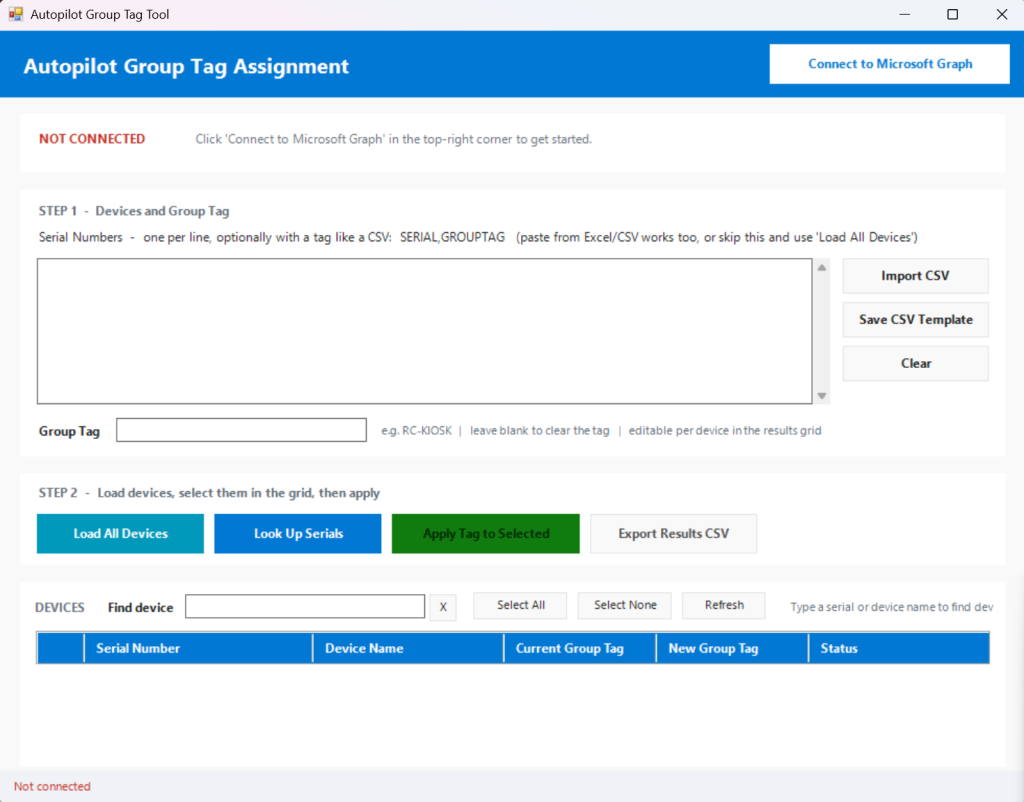
What came out is a single window with a clear flow: connect, paste or import your serial numbers, load the devices, then a results grid where you tick the ones you want and apply the tag. The grid lets you edit the tag per device, so you’re not locked into one value for the whole batch. A CSV import maps a SerialNumber and optional GroupTag column straight in. A live search filters the loaded devices as you type, using the same dash-and-space-insensitive matching as the lookup, so finding one device in a long list is instant.
The actual write back to Intune is one focused call per device, a POST to the device’s updateDeviceProperties with the new group tag. Everything else in the tool exists to make getting to that one call fast, safe, and hard to fumble.
What actually changed
The finished tool does in about 30 seconds what used to eat an hour. Connect, import, select, apply, done. One file with a launcher, no installer, no dependencies beyond a single Graph module it installs itself if it’s missing.
But the tool is almost beside the point. The shift is in the path I just walked you through. I was the one who knew the customer, ran it against reality, spotted why the filter and the sign-in were failing, and decided what was good enough to ship. Claude turned that knowledge into working code and caught the technical traps before I hit them. It even wrote the documentation, the README and the handoff notes, the work I’d normally skip because there’s never time.
That’s the real change. Building a small, specific, internal tool used to be a project you had to justify and schedule. Now it’s something you can do between two meetings, as the person who actually understands the problem.
And that’s what this is really about. Not whether AI can write code, but what it changes about how we work once it can.
If you’ve built something like this for your own tenant, I’d like to know where you landed on the auth question, because that’s the decision I went back and forth on most. Delegated and accountable, or app-only and quick?an.