I’ll be honest with you. The first time I let Copilot Cowork loose on a real task, I sat back like a kid watching a magic trick. You point it at a pile of files, walk away to make coffee, and come back to a finished result. Not a draft. Not a “here’s a starting point.” Done.
And then it clicks: this thing now costs money every single time it runs. Per task. By the second, basically.
So let’s get into what that actually means. As of June 16, 2026, Copilot Cowork is generally available worldwide, and it’s the first Copilot feature that bills you for what you use rather than for who you’ve licensed. If you run a Microsoft 365 tenant, it’s worth understanding the model before someone on your team falls in love with it the way I did and runs up a bill nobody planned for.
So what even is it? Cowork isn’t another chatbot in a sidebar. It’s an agent that goes off and does long, messy, multi-step work on its own and brings back something actually finished. We’re talking about jobs like comparing thousands of files across two product versions, or pointing it at a stalled sales pipeline and getting back a ranked list of deals that are slipping, with the exact follow-up that went cold on each one. That’s genuinely useful, and it’s also genuinely expensive to run under the hood. Which is exactly why Microsoft didn’t fold it into a flat monthly price.
So what changed, and why it suddenly costs money
For two years, Copilot pricing was beautifully boring. You bought a seat, the user got the features, and finance knew what next month looked like down to the cent. Cowork throws that out. Every task you run gets priced on four things: which model did the work and how much of it, how much of your company’s data it had to pull in, how many tools or plugins it called, and how long the whole thing ran. The currency is something called Copilot Credits, and on pay-as-you-go one credit is one cent. Sounds tiny. It adds up faster than you’d think once people get hooked.
The licensing stack is worth being precise about, because it shapes the whole cost picture. Cowork isn’t a standalone purchase. A user needs the full Microsoft 365 Copilot license first, the same per-user-per-month one that already covers Copilot Chat and Copilot in Word, Excel, PowerPoint, Outlook and Teams, plus the pre-built agents. Cowork then sits on top of that as a pay-per-use extra. So the real cost is two layers stacked together: a predictable monthly seat, plus variable credits on top. The practical consequence is that there’s no “give Cowork to a couple of power users without paying for full Copilot seats” route. If they’re using Cowork, they’re already carrying a seat.
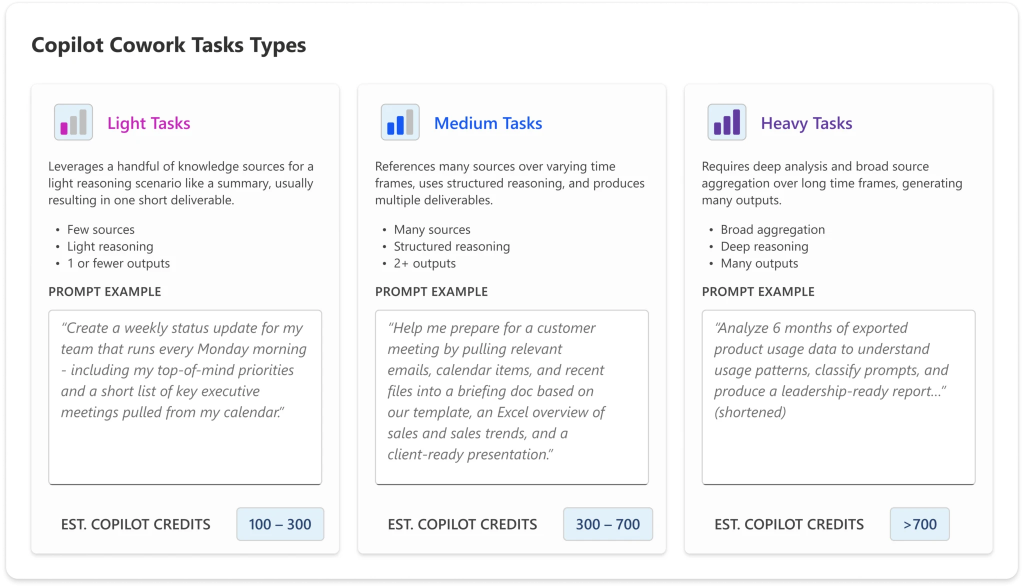
And the variable layer behaves in a way your old per-seat instincts will get wrong. From the preview program, Microsoft noticed tasks fall into three rough buckets. Light tasks pull in a couple of sources, do a bit of reasoning, produce one output, and stay cheap. Medium tasks draw on several sources, reason in a more structured way, and generate a few outputs. Heavy tasks aggregate broadly, reason deeply, and spit out a pile of outputs, and that’s where the credits really go. The thing to internalise is that ten quick light tasks can cost you less than one big heavy one. Your spend isn’t really about how many people are using Cowork or how often. It’s about what they’re asking it to do.
One date to circle while you’re at it. Billing started on June 16, but there’s a grace window: if your tenant had even one person using Cowork in the Frontier preview between March 30 and June 16, you don’t get billed until July 1, 2026. If that’s you, don’t waste the runway. Get your guardrails up before the real charges start, not after the first invoice makes someone’s eye twitch.
Where you actually configure all this
Microsoft shipped real controls at GA, not just a meter, and almost all of it lives in one place: Microsoft 365 admin center → Copilot → Cost Management.
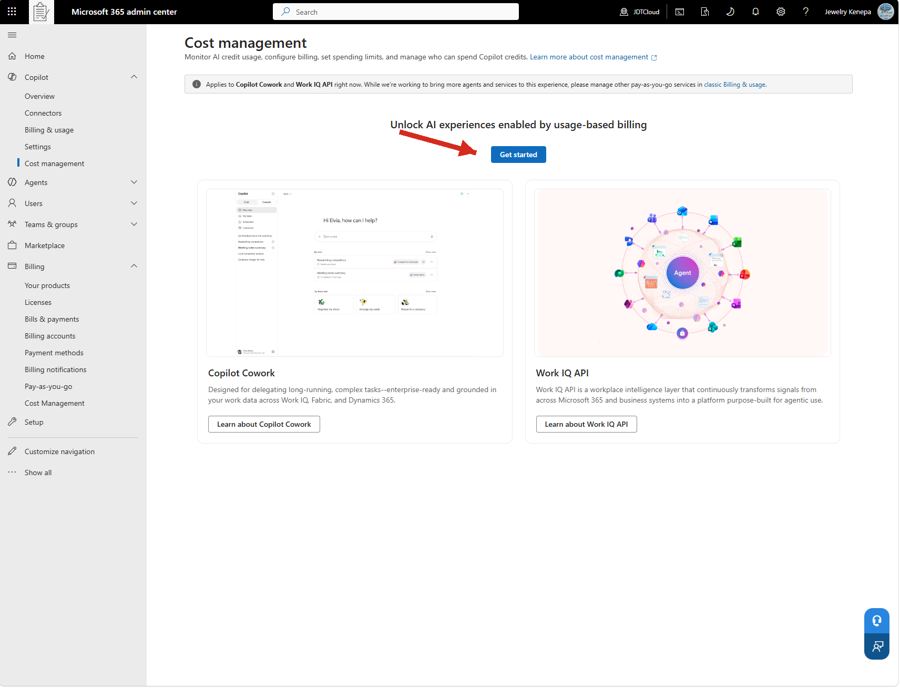
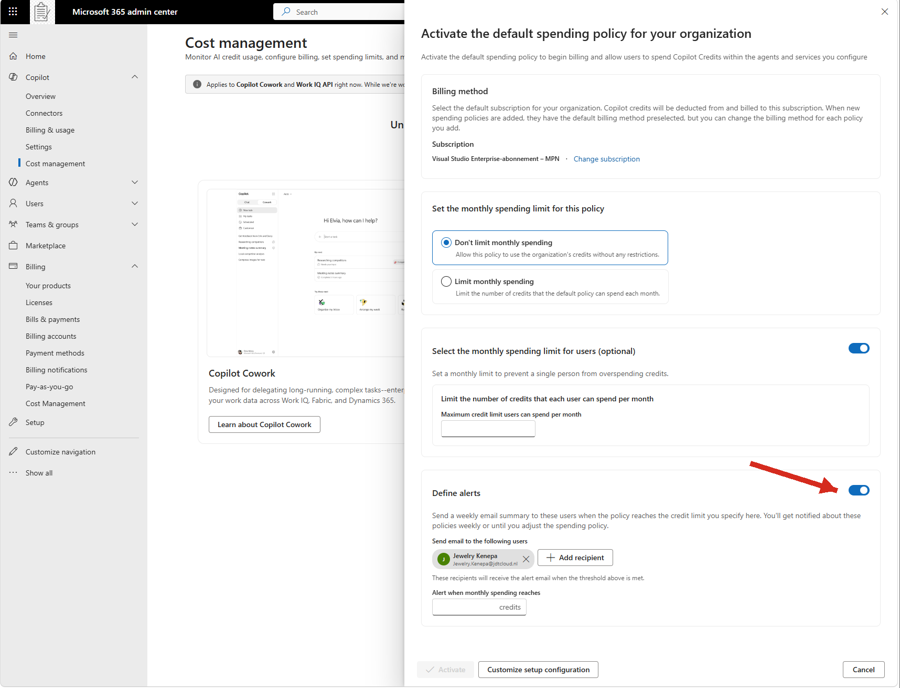
That same Cost Management node is also where you switch the whole thing on. There’s a Get Started button that opens a side panel to activate your default spending policy, and that policy is what actually unlocks Cowork (and the Work IQ API) in your tenant. No policy, no Cowork. One thing to be careful about here: the billing method you pick on a policy is locked once the policy is created, so to change it you have to delete the policy and build a new one. Choose it deliberately the first time.
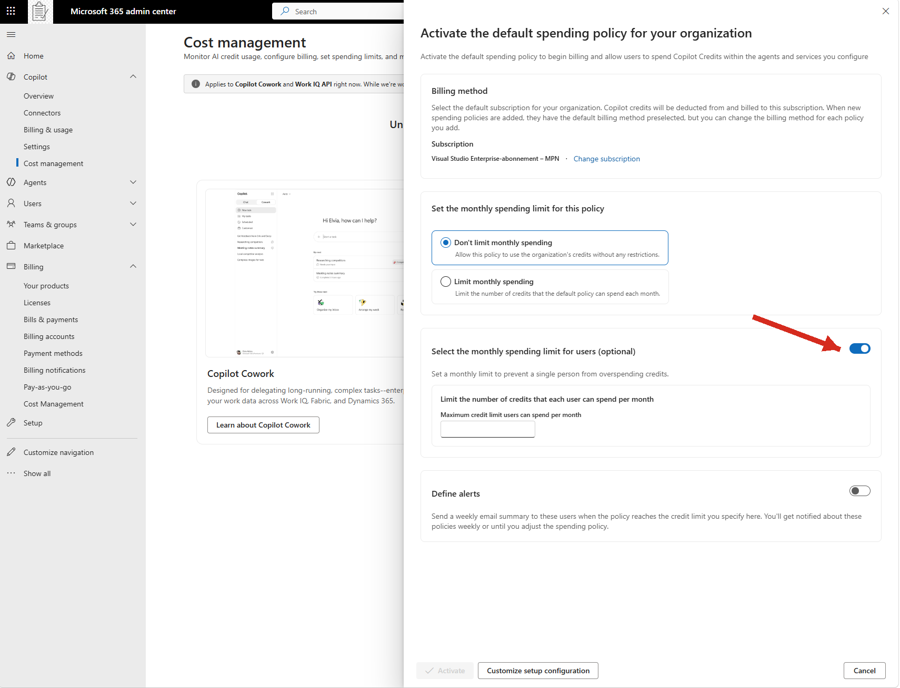
From the same dashboard you create your spending policies, and this is where your hard caps come from. Each policy lets you pick the service, the billing method, the monthly credit cap, the scope (one shared limit across the whole policy, or a cap per individual user) and optional email alerts at a credit threshold you choose. When a user, group or tenant hits its limit, access to the metered services stops until credits reset on the first of the next month. To see what’s actually being spent, the Overview tab gives you real-time spend and remaining capacity, and the Consumption tab lets you drill into usage by user, group, service or agent so you can spot your heaviest users and biggest cost drivers.
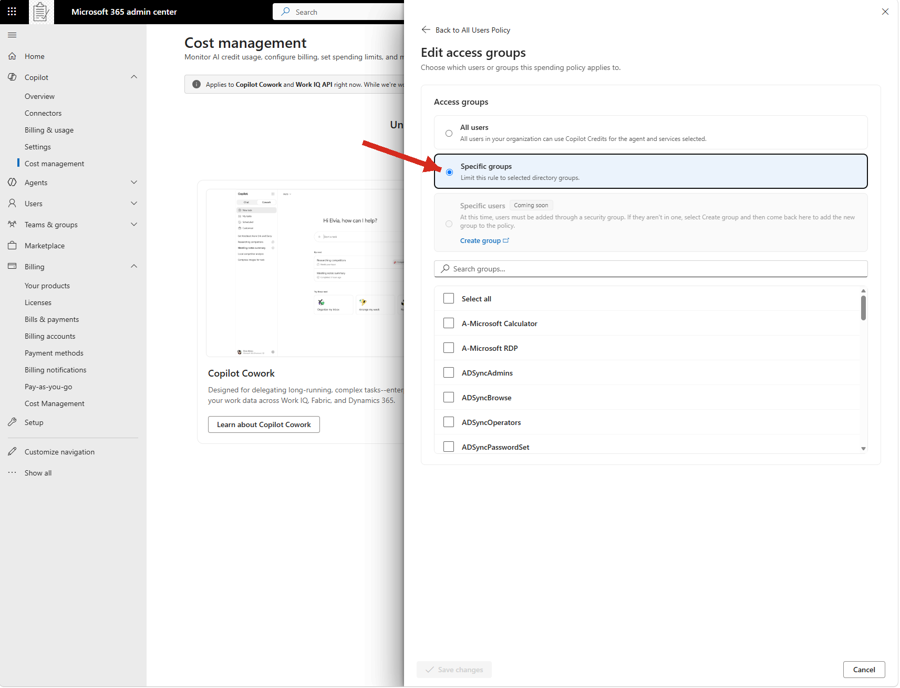
A policy doesn’t have to apply to everyone, and for a controlled rollout you’ll want to make sure it doesn’t. Under access groups you can switch from All users to Specific groups and scope the policy to selected directory groups, which is exactly how you fence Cowork off to a pilot population rather than the whole tenant. Specific individual users isn’t available yet (it’s marked coming soon), so for now targeting runs through security groups: if the people you want don’t already sit in one, create a group first and then point the policy at it.
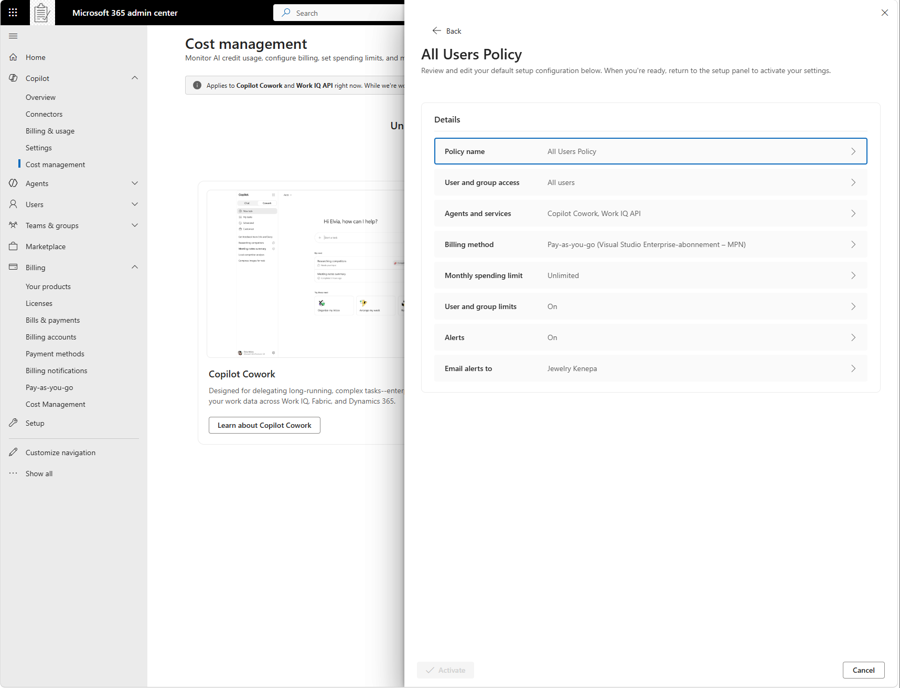
Before you activate, the setup gives you a summary of the whole policy in one place, so you can sanity-check the billing method, the spending limit, the user limits and the alert recipients before anything goes live.
A couple of important settings sit outside that dashboard. Discovery, which controls whether users even see Cowork, is separate from billing, and that separation trips people up constantly. If you make Cowork discoverable but haven’t enabled billing, users can request access from inside the app and you approve case by case. If users suddenly can’t see Cowork after GA, it’s almost always the discovery setting plus policy gating rather than a bug. Model choice is another lever worth knowing about, since cheaper models mean cheaper tasks, and you turn individual models on or off under Microsoft 365 admin center → Copilot settings (there’s also a leaner model called Cowork 1 on the way, built to handle everyday tasks for a lot less). And if you own compliance, Cowork’s prompts, responses and artifacts all flow through Microsoft Purview for audit, eDiscovery, DSPM, Insider Risk and the rest, so that’s your surface.
One last thing that’ll save you a headache: roles matter here. Setting or changing the billing method needs Global Administrator or Billing Administrator. Creating spending policies, limits and alerts can be done by an AI Administrator or License Administrator, but those roles can’t change the billing method. Sort out who holds what before you start clicking, or you’ll get halfway through and hit a wall. (Prices and exact blade labels are US-list and current as of writing. Buy through a CSP or Enterprise Agreement and your numbers may differ, and Microsoft is still rolling some of this out, so a label might shift under you.)
How to roll this out without surprises
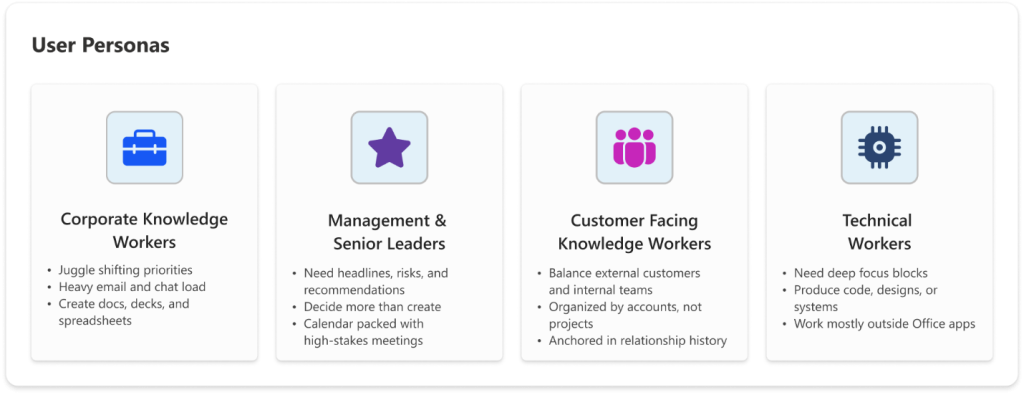
The safe rollout order is straightforward, and it matters because the costly mistakes here are all front-loaded. Cowork is off by default, so start there and leave it off until the rest is in place. Pick a small pilot group with a clear use case rather than the whole knowledge-worker population. Set hard caps at the group and user level before anyone gets access, and switch on alerts pointed at whoever owns the budget. Let the pilot run for a few weeks and watch the Consumption tab, because that’s how you learn the real light, medium and heavy mix for those users, and that mix is your whole cost model. You can’t guess it accurately up front.
Once you have real numbers, model the spend with Microsoft’s estimator spreadsheet (search “Customer Cowork Estimator”) using your actual figures rather than the example ones, then decide between pay-as-you-go and the committed P3 option. Pay-as-you-go at a cent a credit keeps you flexible; committing to a volume up front gets you a discount if your estimate is solid. Expand access last, once the guardrails are proven on a group you were watching closely. The whole point is that nobody discovers the cost the hard way.
The bigger picture
Cowork’s pricing is a sneak peek at where Microsoft 365 is heading. We’re moving from “buy a seat, get the features” to “pay for the work the agent actually does.” Per-seat licensing isn’t going anywhere, but there’s now a usage-based layer sitting on top of it, and that layer quietly rewards the teams that govern it on purpose and punishes the ones that don’t. The orgs that win with Cowork won’t be the ones who turned it on fastest. They’ll be the ones who turned it on deliberately, with caps and visibility and a real sense of what a heavy task costs them.
Get addicted if you want. I clearly did. Just put the guardrails up first.
How are you handling Cowork billing in your tenant? Flipping it on for everyone, or starting with a tight little pilot? I’d love to know how others are setting their caps.