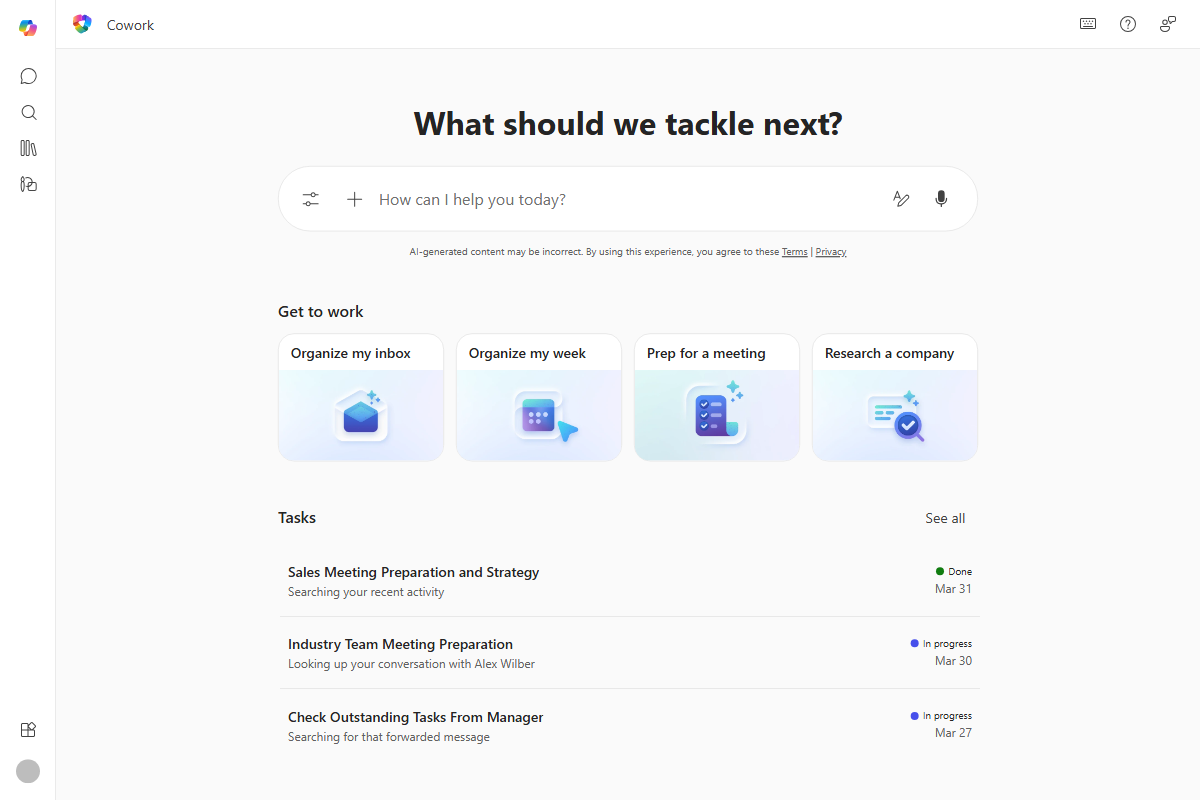
Copilot Cowork: When AI Stops Chatting and Starts Doing
If you’ve spent any time with Microsoft 365 Copilot, you already know it’s great at answering questions and drafting things. Ask it to summarize a thread, rewrite a paragraph, or pull together a status update, and it’s done in seconds.
But that’s only half of the work most of us do in a day. The other half is the follow-through: rescheduling the meetings, building the deck, sending the email, updating the spreadsheet, coordinating the next step. That’s where the new wave of Copilot is heading, and Copilot Cowork is Microsoft’s name for it.
What is Copilot Cowork?
Copilot Cowork is a new capability inside Microsoft 365 Copilot that lets you delegate entire tasks, not just ask questions. Instead of prompting Copilot turn-by-turn, you describe the outcome you want and Cowork goes off and does the work across Outlook, Teams, Excel, Word, PowerPoint, and the rest of Microsoft 365.
Microsoft announced it in March 2026, framing it as “the era of Copilot execution.” In practice, that means Copilot can now:
- Build a plan from your request
- Pull in the right context from your emails, meetings, files, and chats
- Take real actions on your behalf
- Check in when it needs your input
- Keep going in the background while you focus on something else
The engine behind this is something Microsoft calls Work IQ, the layer that reads signals across your Microsoft 365 environment so Cowork can act with the same understanding of context that you have when you start your day.
How it actually works
Cowork follows a simple pattern: intent, plan, action, checkpoint.
- You describe the outcome. Not a prompt, not a step-by-step instruction. Just what you want to be true at the end. “Clean up next week’s calendar and protect Wednesday morning for the proposal.”
- Cowork turns it into a plan. It breaks the work down, identifies what it needs to do, and what sources it has to pull from.
- It runs in the background. Tasks keep moving even when you switch devices or close your laptop. Microsoft is hosting these in a protected, sandboxed cloud environment so the work is durable.
- It checkpoints with you. Before applying anything that changes the world, like sending a message, declining a meeting, or sharing a file, Cowork surfaces its recommendation. You approve, edit, or pause.
- You stay in control. Every action is auditable. Identity, permissions, and compliance policies apply by default.
You can have multiple tasks in flight at the same time. That’s the part that changes the rhythm of the day: instead of context-switching between ten small jobs, you hand them off and check back when each one needs you.
Four examples worth knowing
Microsoft’s launch post walked through four scenarios that show what “execution” actually looks like:
1. Calendar cleanup. Cowork reviews your Outlook week, asks what you’re trying to prioritize, flags conflicts and low-value meetings, then, with your approval, accepts, declines, or reschedules them. It can drop in focus blocks and even send a prep doc ahead of a meeting.
2. Meeting packet preparation. Hand off a customer meeting end-to-end. Cowork pulls inputs from email, meetings, and files; schedules prep time on your calendar; and produces a connected set of deliverables: a briefing document, supporting analysis, and a client-ready deck, all saved in Microsoft 365 so your team can refine it together.
3. Company research. Cowork gathers earnings reports, SEC filings, analyst commentary, and news, organizes findings with citations, and packages everything into an executive summary, a structured research memo, and an Excel workbook with labeled tabs.
4. Launch planning. For a product launch, Cowork builds a competitive comparison in Excel, a value proposition document, a customer pitch deck, and a milestone plan with owners and next steps. Coordinated, not stitched together from one-off prompts.
The common thread: Cowork isn’t just creating content. It’s coordinating the work around the content.
Built for the enterprise
This is the part that matters most for the clients I work with. Cowork runs entirely within Microsoft 365’s existing security and governance boundaries:
- Identity and permissions apply by default. Cowork can only see and act on what you can see and act on.
- Compliance policies carry through to every action.
- Actions and outputs are auditable, so admins have a trail.
- Sandboxed execution keeps long-running tasks safely isolated.
There’s also an interesting model story underneath. Microsoft worked closely with Anthropic to bring the technology behind Claude Cowork into Microsoft 365 Copilot. Microsoft’s pitch is that Copilot isn’t locked to a single model family. It picks the right model for the job, whoever built it.
Why this matters
For years, the productivity-AI conversation has been about assistance: faster drafting, faster searching, faster summarizing. Cowork shifts the conversation to delegation. That’s a meaningful change in how work flows, and it’s the direction every serious AI productivity tool is heading.
For organizations rolling out Copilot today, Cowork is a signal worth paying attention to. The teams that get the most out of it will be the ones that have already done the foundational work: clean permissions, well-governed content, and a culture where people are comfortable handing off tasks and reviewing the result rather than doing every step themselves.
How to get started
As of March 2026, Cowork is in Research Preview with a limited set of customers. Microsoft has said broader availability is coming through the Frontier program in late March 2026. If you’re in an organization on the Microsoft 365 Copilot Frontier track, this is the moment to put your hand up.
The era of Copilot answering questions isn’t over. It’s just no longer the headline. The headline now is Copilot doing the work.
Leave a Reply